 Arova
Website + Market Place
A website in 5 minutes, and neighbours who send you the guests they can't fit
Two things a small guesthouse usually lacks: a website of its own, and somewhere to send the group of 12 that writes when the house holds 8. Arova handles both. Self Booking → Website builds your site from what you've already filled in. Self Booking → Market Place links you with the properties around you, so a group that's too big still books. Part of it stays with you, the rest stays a few kilometres away, and whoever sent the guests gets 5%.
Three big problems, solved
Running a guesthouse or villa usually means three headaches that have nothing to do with the guests themselves. Arova takes care of all three:
- The website, without being forced into ours. No site? Arova builds one for you in two clicks (below). Already have one you like? Keep it. Paste our widgets onto it with one line of code each: the booking box (free dates, prices, card payment), the price boxes with the first free dates, and the live chat bubble. The chat doesn't have to be WhatsApp: visitors write straight from your page, and the conversation lands in Reception, where the AI reception answers it like a WhatsApp, email, Messenger or Instagram message. The same goes for the chats on your OLX ads: connect your OLX account and those conversations come to Reception and get answered too.
- Card payments, with no technical work. In Property → Accounts → Stripe, press Connect Stripe and follow Stripe's sign-up: your company details, the legal representative's ID and your bank account, plus a few company documents if Stripe asks. Once Stripe approves you, you're on. There are no integrations to build and no payment terminal: every proforma, the booking page and your website get a Pay by card option, and the money goes straight into your own Stripe account. Arova takes 7% only of card payments, with no monthly fee.
- Help from your neighbours when you run out of rooms. When you're full or a group is too big, the Market Place sends the guests you can't fit to joined properties within 10 km, and you earn 5% of what they pay. It works both ways: when your neighbours run out of room, their guests come to you.
In short
- A website in two clicks: at yourproperty.arova.ro, in Romanian and English, written from the Property tab, with the booking box, terms and privacy page included.
- Or keep your own site and add the booking box and the live chat to it. The chat leads to the same AI reception.
- Card payments without integrations: connect Stripe, upload what it asks for, and you're on.
- No monthly fee: the site costs nothing; Arova takes 7% only of card payments.
- Market Place: properties that join take each other's extra guests within 10 km. The guest sees the free places, their distance and their price on your booking page.
- 5% to the sender, only of what the guest actually paid. You settle between yourselves.
- Your AI reception offers it too, on WhatsApp, email, Messenger, Instagram, OLX, the live chat and phone calls, but only when a group is larger than your property holds.
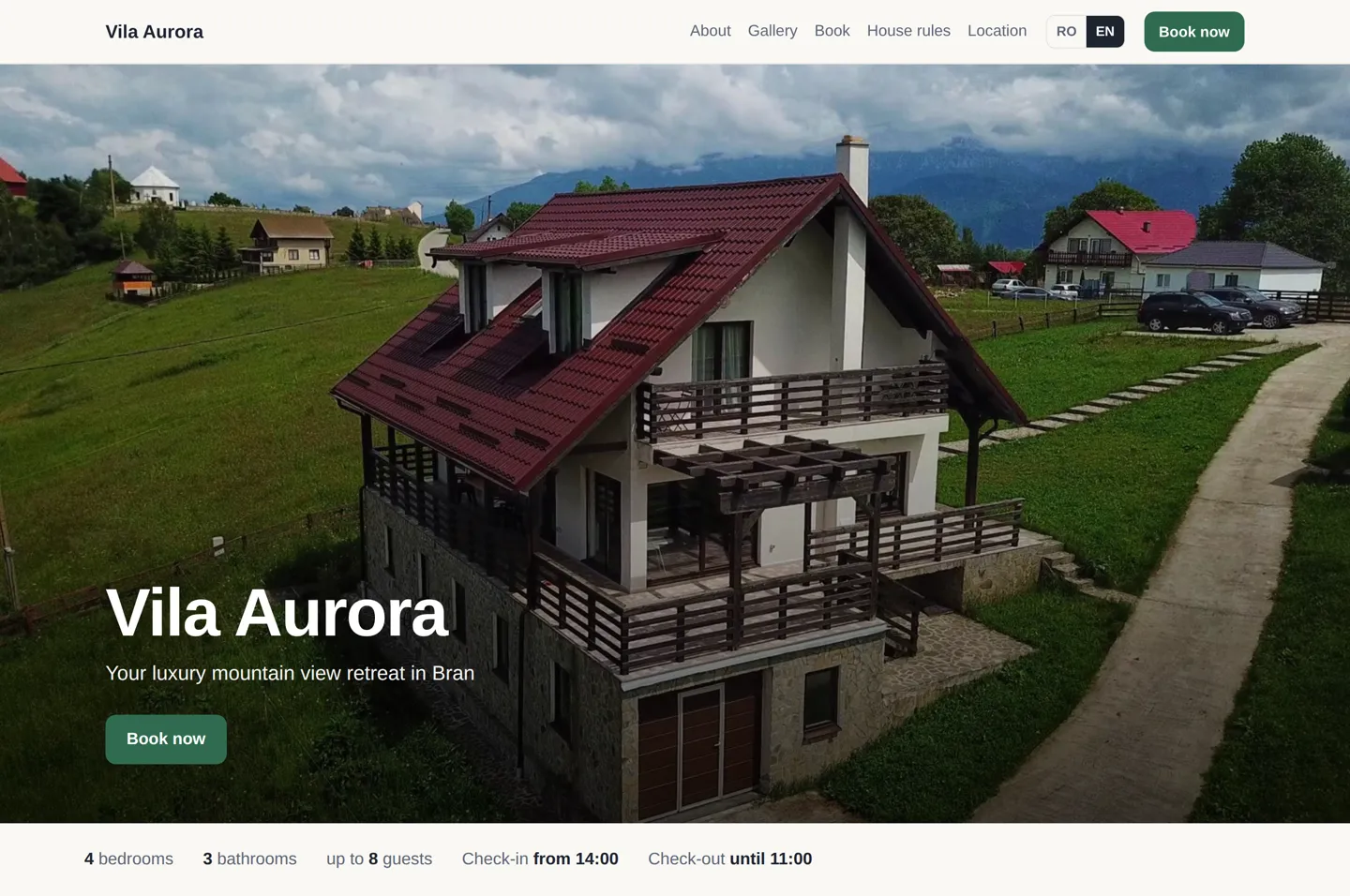
1. Your website in 5 minutes
- Fill in the Property tab if you haven't yet: at least three photos, the Google Maps link, the details and amenities, the check-in and check-out times and the house rules. Self Booking needs these anyway.
- Switch on Self Booking (Property → Self Booking). The website takes its bookings through it.
- Open Self Booking → Website and tick “A website for the property”. Arova writes the texts in Romanian and English, which takes up to a minute.
That's it. The site goes live at yourproperty.arova.ro within 5 minutes, with its own security certificate. Until then the tab shows a working temporary address.
2. What's on it, and where it comes from
Nothing on the site is typed in twice. Each part comes from somewhere you already keep up to date:
- Photos, details, amenities, what's nearby, house rules and cancellation terms come from Property & pricing.
- Your Google rating and best reviews come from Marketing → Reviews.
- The booking box shows your free dates and each night's price, and takes card payment when Stripe is connected.
- The map, WhatsApp, phone and email, and your social links in the footer.
- Gift vouchers and Green Stay, when you have them switched on.
- Terms and conditions and a privacy notice, written from your company details and booking rules, with the ANPC and SAL links and what GDPR asks you to tell guests.
Change something in the Property tab and the site follows within minutes. If you change a lot at once, Write the texts again has them rewritten.
3. Getting it found
- Search engines: the site has a sitemap and the property's details in the format Google and Bing read (amenities, price, rating, FAQ). Bing is told within the hour when the site goes live or changes.
- Google Maps: put the address as your business's website in your Google Business Profile.
- Instagram and Facebook: put it in your bio.
- AI assistants: with Self Booking → MCP Server on, ChatGPT and Claude give the site as your property's website.
Already have a website? Then you don't need this one. Paste the booking box code from Self Booking onto your own site, and the live chat script from Property → Messaging → Live Chat, and everything below works there too.
4. The Market Place: when the group is bigger than the house
A school reunion of 14, two families of 6 and 5, a team of 20. Most hosts answer “sorry, we only hold 8” and the booking is lost to everyone. Your neighbour down the road might well have had room.
The Arova Market Place fixes that. In Property → Self Booking → Market Place, tick Join Arova Market Place. Joining needs your property's Google Maps link, because the distances are measured from it. From then on:
- Every property that has also joined, within 10 km, shows in the tab with its distance.
- When a group is larger than your property holds, your booking page offers those properties for the rest of the group, with their exact distance, whether they're free on those dates and their price.
- It works both ways: their booking pages offer your property for their extra guests.
Both properties have to join, and joining costs nothing. You pay only when a guest you received actually pays.
5. What the guest sees
On your booking page, under the number of guests, the guest taps “Your group is larger than 8?” and says how many they are in total. Arova splits the group: as many as fit stay with you, and the rest are offered the joined properties nearby.
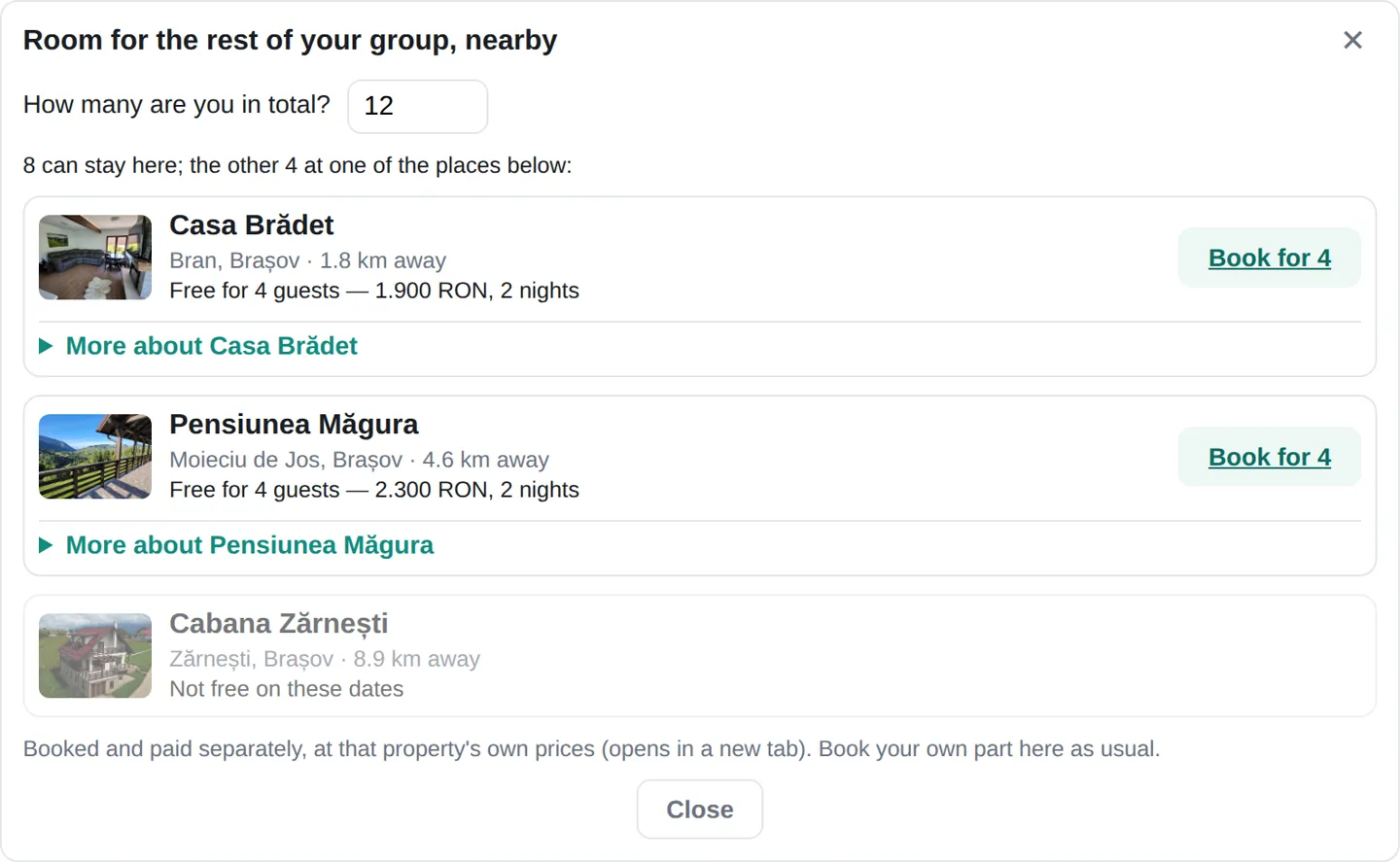
- Places that fit the rest come first, then the nearest. Each shows its photo, its distance and the price for the rest of the group.
- “More about …” opens the other property's photos, rooms, amenities, house rules and a map of both places. Its website, phone and email are left out, so the booking stays on Arova and your 5% stays with you.
- “Book for 4” opens that property's own booking page with the dates and the 4 guests already filled in. Its page says “The rest of your group from Vila Aurora: book here, at our prices.”
- Each part is booked and paid separately, at each property's own prices and on its own terms. Nothing changes for the part that stays with you.
6. The AI reception offers it too, on WhatsApp and on the phone
Most big groups don't start on the booking page. They write or call first. That's why the Market Place is built into the AI reception too: WhatsApp, email, Messenger, Instagram, OLX chats, the live chat on your site and AI phone calls.
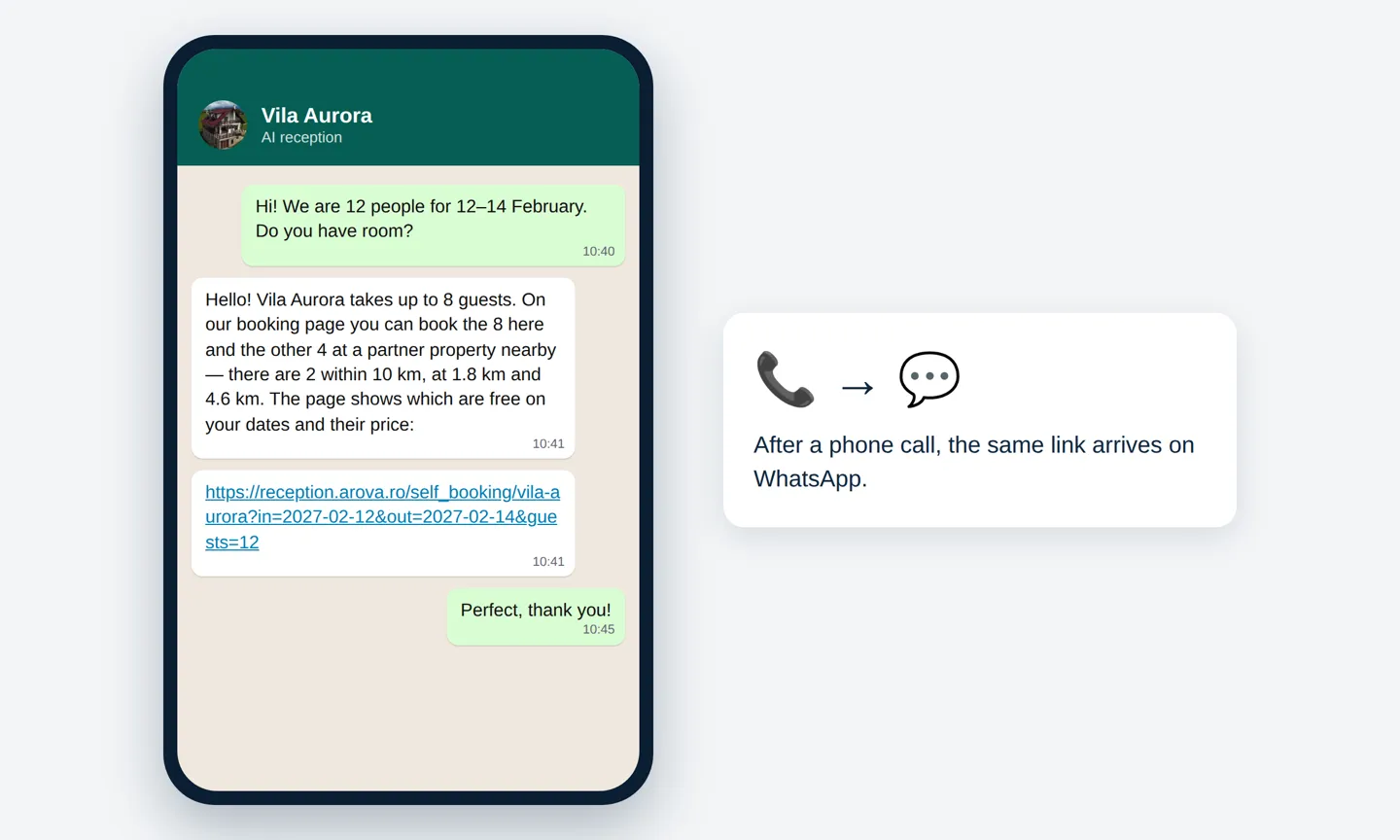
- It speaks up only when it's needed: when the guest says the group is larger than your property holds. It never brings up the Market Place in other conversations. Children sleeping with their parents in the existing beds don't count toward the limit.
- It says how many you take and how far the partner properties are, but never names them. The booking page shows the names.
- It sends your booking page link with the dates and the whole group filled in. The page then opens the “rest of the group” part by itself, so the guest goes straight to the choice.
- It doesn't promise what it can't know. It doesn't say a neighbour is free or quote their price. Only the booking page knows that, live.
- On a phone call the AI explains this out loud, and the link arrives on the caller's WhatsApp right after the call.
The result: a group of 12 calls at 11 at night. Without any help from you, 8 of them book with you and 4 book with a neighbour, who owes you 5% for them.
7. The 5% and Settlement
When a guest arrives through another property's Market Place offer, the property that received them owes the sender 5% of what the guest actually paid. A refund lowers the fee. A cancellation with nothing paid means no fee at all.
The Settlement table in the Market Place tab shows, for each neighbour, what you owe, what you're owed and the balance, booking by booking with the proforma and the amount paid. Arova doesn't move the money: you settle between yourselves, and the property that's owed marks the fee received. Neighbours who send each other guests often find the balance comes out close to even.
8. Why the two belong together
A website brings guests who look for you. The Market Place brings guests who were looking for someone else, plus whatever your neighbours can't fit. Both run through the same booking page, the same AI reception and the same invoices, so neither adds work. A new property can be online on Monday and receive its first overflow group on Friday.
Every setting, step by step: Website in the manual.
9. Questions and answers
Does the website cost anything?
No. Arova has no monthly fee. It takes 7% only of payments made by card, through the website or anywhere else.
Can I use my own domain?
The site lives at yourproperty.arova.ro. If you already have a domain with a site on it, paste the booking box onto that site instead. You get the same calendar, prices and Market Place.
Will my neighbours see my guests or my prices?
No. A neighbour sees only that you've joined and how far away you are. Guests see your free dates and price for their own dates on your booking page, the same as anyone would.
Can a nearby property take my guests away?
The offer appears only for the part of a group that doesn't fit with you, or when you're full on those dates. A guest who fits with you is never shown anyone else, and your AI reception never names your neighbours.
Why 10 km?
So a group split between two houses can still meet up for dinner. Services (a gazebo, e-bikes, rides) reach 50 km, because guests will drive for them. See Services in Arova.
Can I leave?
Yes. Untick Join Arova Market Place and you stop showing up from that moment. Fees for guests already paid stay in Settlement until they're marked received.