 Arova
Services
Services in Arova: rent out your gazebo, e-bikes, rides or tours like a property
Many guesthouses have something more to offer than rooms: a gazebo with a barbecue, a few e-bikes, ATV rides, a tour of the area. Until now these were booked by phone, paid in cash and written down on paper. With Services, each of them gets what a property gets in Arova: its own calendar, booking page, website and AI reception — and the guest pays by card, with the invoice issued by itself.
Services in short
- A service works like a property: its own calendar, booking page, website, AI reception and invoices.
- Booked the way it works: the whole day, time slots, or a number of items.
- Tied to your guesthouse if you want: bookable only on the days the house has no guests.
- Open days and prices in your own words, or by selecting days and right-clicking.
- Paid by card, no cancellations; the invoice goes to e-Factura by itself.
- Found everywhere: on nearby properties' booking pages and TVs, in AI assistants like ChatGPT and Claude, and through affiliates' links.
- Same pricing as stays: 7% only on card payments, no monthly fee.
The easiest way to put a service online
You don't build anything. Give the service a name, a Maps link, a price and three photos, and Arova makes the rest for you:
- the booking page, with the free days, prices, photos and directions;
- a website of its own, in Romanian and English, with its terms and privacy page;
- the calendar, kept in sync with your guesthouse if you want;
- the AI reception on WhatsApp, email, Messenger and Instagram;
- the invoices, issued after each payment and sent to e-Factura.
Card payments take a few clicks: connect Stripe once (or nothing at all, if your business already has — the service uses the same account) and guests pay by card straight away.
1. Adding a service
Services are for registered businesses (a company with a CUI). There are two ways in:
- At sign-up: at reception.arova.ro/signup, under What brings you to Arova?, pick I have a service which I want to provide. You don't need a property.
- Next to your properties: in the app, open the account menu (top right) and choose Add a service.
You give it a name, its type and how it's booked. For the place, paste a Google Maps link to where guests meet — or choose one of your business's properties under Take the address from. The link becomes the 📍 Directions button on the booking page.
2. How it's booked
In the service's Service & pricing → Booking & prices, choose under Booked by:
- The whole day — a gazebo, a hall, a boat: one booking a day, a price per day.
- Time slots — rides, tours, lessons: the start times (e.g. 10:00, 12:00, 16:30), how long each lasts and up to how many people at once, a price per person.
- A number of items — e.g. 6 e-bikes: how many you have, a price per item per day.
You also set the price, the currency, how many hours ahead it must be booked and how many days ahead it can be, a description in English and Romanian, at least three photos and the welcome message emailed once the guest has paid.
3. Only when the guesthouse is free
A gazebo in your guesthouse's garden shouldn't be rented to strangers while your guests are staying. Under Only when this property has no guests, pick the property and the service follows its Calendar: it can't be booked on days the house has guests (check-in and check-out days included), is being cleaned, is closed or in personal use, or is booked on Booking.com or Airbnb. Nothing to keep in sync by hand.
4. The calendar: open days and prices
A service's Calendar looks like your property's: each day shows its price when it can be booked, and why not when it can't (closed, the property's guests, full). There are two ways to change it:
- In words, in the chat beside the calendar: “open only Monday to Thursday”, “400 lei on Saturdays”, “closed 24–26 December”, “500 lei on New Year's Eve”. Arova shows what would change; nothing is saved until you press Apply.
- By hand: click a day, then another, to select the days between. Right-click (a long press on a phone) and choose Open, Closed, Set price… or Back to the usual price. Saved at once.
Prices work from the most specific: a price on a date, else a price for that day of the week, else the usual price.
5. Self Booking: what the guest sees
Everything under the service's Self Booking is ready to use:
- Booking page — its own link, to share anywhere: on Facebook, in a WhatsApp status, in an OLX ad, on a QR code at the gate.
- Website — a full site at its own name.arova.ro address, in Romanian and English, with the booking calendar inside.
- The booking box for your own site — already have a website? Paste one line and the calendar, with card payment, shows up on it.
Each of them shows the photos, the description, the Directions button and the free days with their prices. The guest picks the day (and the time, or how many), pays by card and gets your welcome message by email. The booking is held for 30 minutes while they pay. Service bookings can't be cancelled, and the website says so.
6. AI reception
A service answers on WhatsApp, email, Messenger and Instagram like a property does. The AI answers from the service's description, free days and prices, and sends the booking link with the day filled in. If the service shares a mailbox with your guesthouse, choose it under Accounts → Email → Use the email of — though a separate address keeps the two inboxes apart.
7. Getting found
- By your own guests: in the service's Market Place tab, tick Show this service with my business's other properties and services. Your properties' booking pages then show it under Also from us, and their AI suggests it when it fits what the guest asks. No fee — it's your own business.
- By other properties' guests: join the Market Place. Joined properties within 50 km can send you their guests; you pay them 5% of what was actually paid.
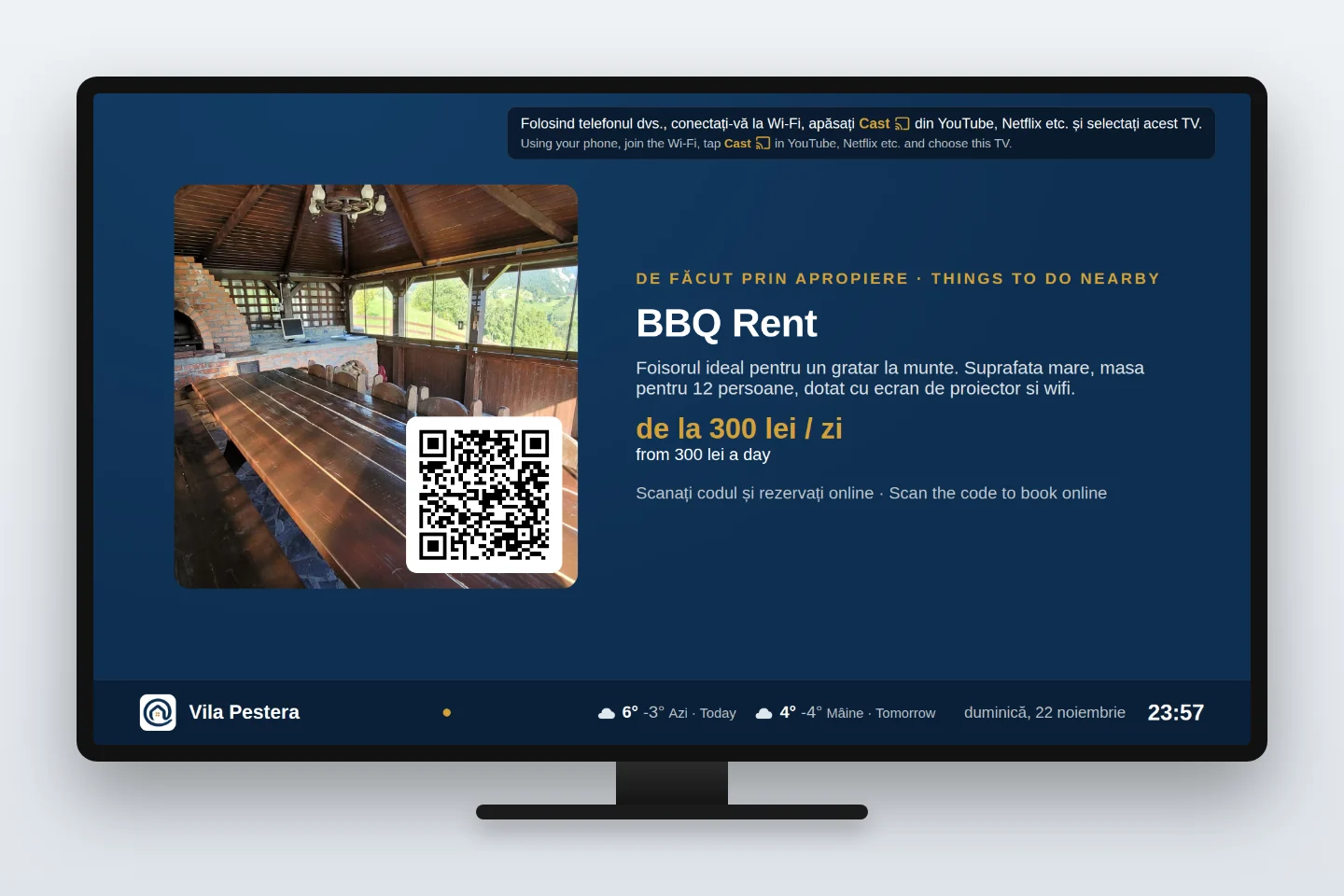
- On the TVs in their rooms: your service appears on the Arova TV screen of your own properties and of the joined properties within 50 km, under Things to do nearby — its photo, its price and a QR code. The guest scans it from the sofa and books on their phone.
- In ChatGPT, Claude and other AI assistants: in Self Booking → MCP Server, tick Show in AI assistants and the Arova directory, and assistants connected to Arova find your service when a guest asks what to do in the area — with the free days, the price and a booking link for the day they want.
- Through affiliates: in Self Booking → Affiliates, give a partner — a guesthouse nearby, a tourist guide, a blogger — their own link to your service. Their guests get the partner's discount, and the partner gets their commission once the booking is paid. Arova counts the visits and the commission for you.
8. Payments, invoices and accounts
A service shares the business's accounts: Stripe, SmartBill and e-Factura are the same as your properties', set up once. Each paid booking is invoiced at once, with the service's own invoice series, and sent to e-Factura after 48 hours. Arova's fee is the same as for stays: 7% only on card payments, no monthly fee.
Step by step, with every setting: the Services chapter of the manual.
9. Questions and answers
Do I need a property to offer a service?
No. Sign up with I have a service which I want to provide and the service is all you'll have. You can add a property later.
Can a private person offer a service?
No — services are for registered businesses, because each booking is invoiced.
Can a guest cancel?
No. Service bookings are paid by card and can't be cancelled; the booking page and the website say so before payment.
Can I have several services?
Yes. Each has its own calendar, page and settings, in the same header menu as your properties.
What does it cost?
The same 7% of card payments as for stays, nothing else. A Market Place booking sent by another property adds the 5% you owe that property.