 Arova
The journey
One stay, seen from both sides: what your guest does, and what's left for you
On arova.ro there's a short version of this: one weekend at a villa, told twice, once from the guest's side and once from yours. This is the long version. For each step it covers what the guest sees and does, what Arova does in the background, what's still left for you, how long it took by hand before, and where it is in the app.
In short
Maria writes on Friday night, books, pays, signs the arrival form, lets herself in, stays the weekend and leaves. A few days later she writes a review. Then Arova goes after the next guest: it checks the competition, sets the price and posts the free weekend, and a new guest books.
On her side there are thirteen steps, and on yours almost none. At Vila Peștera, where Arova was built, the work these steps replace came to about 206 hours a year by hand. With Arova, about 25 are left: reading a summary, approving a draft, pressing Apply.
The example is Vila Aurora, Arova's made-up demo villa: four bedrooms, 6 guests, 2 nights, 3,000 lei. The hours come from Vila Peștera's real year (October 2025 to October 2026).
Part one: one weekend
Each step below has two cards and a line under them. The guest is what Maria sees. You is what reaches the owner, which is usually a notification and often nothing at all. By hand is what the same step cost at Vila Peștera before Arova.
Friday · 23:47 1. Asks if it's free
💬 The guest
Maria writes “Hi! Is the villa free next weekend? 2 nights, 6 of us”. She can ask wherever she found you: WhatsApp, Messenger, Instagram, the chat bubble on your website, email, a phone call, or through ChatGPT or Claude. She writes in her own language.
Within minutes she has the free nights, the exact price for 6 people and 2 nights (3,000 lei), and the link to book.
🏡 You
You're asleep. Arova answers from your calendar, your prices and your house rules, so the quote is the one you would have given.
- Prefer to check first? Turn auto-reply off and Arova writes the reply and waits for your OK.
- Phone calls are answered too, and a guest can book during the call.
- Everything lands in one inbox, Reception, whichever channel it came from.
By hand: about 10 minutes a request to check the calendar, work out the price and reply. At Vila Peștera, 72 people asked to book in a year, and 51% of guests' messages came outside 09:00–18:00 on weekdays (11% between 22:00 and 08:00). The median reply time was 2 minutes, so somebody was always holding the phone.
Reception · Property → Messaging → Reception Training (what the bot knows) · Property → Accounts (WhatsApp, Meta, phone calls)
Friday · 23:52 2. Books and pays, on their own
💳 The guest
The link opens your own booking page. It shows the nights, the guests and the exact total, then card, Apple Pay or Google Pay. Holiday vouchers work too.
If she'd rather pay by bank transfer, the proforma reaches her inbox at once. She gets the confirmation on WhatsApp: “Your door code arrives on the day.”
🏡 You
You get paid, straight into your own Stripe account.
- The dates are blocked in your calendar and closed on Booking.com and Airbnb, so there's no double booking.
- The invoice is issued and sent to Maria, and goes to e-Factura by itself 48 hours later.
- A bank transfer is read from your bank's email and matched to its proforma.
- No OTA commission: of 3,000 lei you keep 2,744, not the 2,550 the same booking leaves you on Booking.com.
By hand: about 40 minutes a booking. That was two proformas (the advance and the balance), asking for company details, checking the bank, and copying the dates to Booking.com.
Self Booking (the booking page) · Accounting → Invoicing · Payments · Calendar
More detail on the invoice and the bank in Made for Romania.
Before arrival 3. Signs the arrival form on the phone
✍️ The guest
Maria gets her stay's link. She photographs her ID and the details are read from the photo. Then she signs the fișa de anunțare with a finger.
The welcome message, the directions (Google Maps or Waze) and your information for guests arrive on their own, each at the right time.
🏡 You
No paperwork.
- The signed form is kept as a PDF for every stay, ready if the police ask.
- Reminders go out until it's signed.
- Welcome, before-arrival and check-out messages are sent by themselves.
By hand: about 22 minutes a stay. That was 10 minutes to collect ID photos and type the details, and three messages of about 4 minutes each.
Property → Regulatory (the arrival form, off by default) · Notifications
Arrival · 16:42 4. Lets themselves in
🔑 The guest
Maria has her own code for the key box, which works only from Friday 16:00 to Sunday 11:00. The house is already warm. The TV greets them with your welcome and the Wi-Fi.
🏡 You
No key handover. Your phone shows “The Popescus arrived, 16:42”, read from the key box.
- The code is made for the booking and removed after it.
- The heating came on before the booking, and goes off after it.
By hand: about 18 minutes a stay. That was 8 minutes to create, send and later delete a code, and two trips through the apps to heat the house and then switch it off.
Smart Guest Home → Key box PINs · Automation · TV screen
Saturday · 02:10 5. Has the house on their phone
🏡 The guest
Smart Guest Home is a page for the stay with the Wi-Fi, the heating, the gate and your house guide. At 2 a.m. Maria writes “It's cold upstairs” on WhatsApp, and the heating goes up.
She can stay one more night with Extend my stay, in two taps, at the discount you set. With Green Stay she sees the heating rule and earns a code for her next stay if she keeps to it.
🏡 You
Your phone stays quiet. Questions are answered at any hour, in the guest's language.
- You hear only what matters: the house too cold, a sensor, a device gone quiet.
- An extra night is paid and invoiced like any booking.
- Green Stay lowers the bill. Each stay's minutes above the limit are counted.
By hand: about 20 minutes of calls a stay. Typically four calls of 5 minutes: the directions, the code, the Wi-Fi, the heating.
Smart Guest Home · Property → Property & pricing → Upsell · Green Stay · Alerts
Sunday · 11:00 6. Checks out, and the house checks itself
👋 The guest
Before the key box opens for the keys, the house tells Maria what she forgot, by name and in her language: “Terrace lights are still on. Kitchen window is open.”
🏡 You
Nobody drives over to check.
- Doors and windows come from their sensors, and lights left on from the cameras.
- The cleaners see in their own app that the house is free. Their report, with stars, a note and photos, comes back to you.
- The heating goes off after the stay, so no empty house is heated.
By hand: about 20 minutes a stay, mostly telling the cleaning team and dealing with changed dates, plus a drive to check if you're unsure.
Smart Guest Home → Doors and windows, Lights left running · Property → Cleaning
Sunday · 14:00 7. Arova writes the stay report
⚙️ Arova
When Maria's access ends, Arova writes a PDF for the booking with what it brought in and what it cost. That covers the electricity, gas and water the stay used, the cleaning and the commissions, and then the profit that's left.
🏡 You
You know what the stay really earned.
- Revenue 3,000 lei. Electricity 86 kWh −95, gas 41 m³ −160, water 1.9 m³ −25, cleaning −250, commissions −256, other costs −324. Profit 1,890 lei, 63%. (Example figures.)
- It also includes the temperatures by day and night, the cleaning report, and a picture from each camera.
By hand: nobody did this. A stay's real profit simply wasn't known.
Calendar → the booking → Activity → stay report · Accounting → Stats → Profitability · Meters
How the water reading works: The water meter, read by a camera.
A few days later 8. Leaves a review, and comes back
⭐ The guest
Maria gets a short survey. Because she was happy, she's then invited to leave a review on Google or Booking.com, and given a discount code for her next direct booking.
🏡 You
You get the review.
- The survey comes first, so a cold bedroom reaches you before it becomes a public review.
- Arova drafts the replies to reviews.
- Her next stay is booked direct, with no OTA commission.
By hand: about 10 minutes a stay for surveys, review requests and replies.
Property → Surveys · Marketing → Reviews · Vouchers → Discount Vouchers
Part two: the next guest
The house is free again. In this part the left card is Arova's, because Arova is the one doing the work, until a new guest arrives.
Every week 9. Looks at the competition
⚙️ Arova
Arova checks what places like yours charge for the dates that matter, like the next weekends and the holidays. It also checks how full the area is and what those places' guests praise and complain about.
🏡 You
You know the market.
- Your price is shown next to theirs, for every date.
- For each open stay you get one move: raise, keep, lower or wait.
- Their reviews and social media are summed up for you.
By hand: about 2 hours a month on Booking.com and Google, and 1 more on their social media.
Marketing → Prices · Competitive set
The same day 10. Sets the right price
⚙️ Arova
For each open date, Arova proposes the change exactly as it would apply: the nights, the old and new price, and why. For example, Fri–Sun 1,500 → 1,620 lei: the area is filling up, still above your minimum margin. It never goes below your costs and the margin you set.
🏡 You
You press Apply, or nothing at all.
- With the autopilot on, the next 60 days change by themselves, with an email for each change.
- It moves at most 30% at a time, and a bigger move is left to you.
- Every change can be reverted, and Booking.com and Airbnb follow.
By hand: about 1 hour a month changing prices on the website and Booking.com.
Calendar → Change prices → Autopilot · Proposed changes
Tuesday · 19:00 11. Writes the post, and publishes it
⚙️ Arova
Arova writes a post from your free dates, the trends and what guests praise, using your own photos and videos: “Next weekend is still free. Fire lit, hot tub ready…” It goes out on Facebook, Instagram and TikTok at the hour you choose.
🏡 You
You don't write a word.
- Approve it, change it, or schedule it for later.
- Facebook video posts carry a real “Send WhatsApp message” button.
- You can also see what the competition posts, and what works for them.
By hand: the post ideas were part of the hour a month on competitors' social media. Writing and posting came on top.
Marketing → Social Media
Tuesday · 21:30 12. A new guest sees it, and books
🎉 The new guest
They tap the post and ask in an Instagram message or on WhatsApp. The story starts again from step 1: the answer within minutes, the booking page, the payment by card. This time it's 3,240 lei, at the new price.
🏡 You
You get the next booking.
- You see where each guest came from: Google, Facebook, Instagram, your website or a partner.
- People who asked and didn't book get a message about the free dates. You press Send.
- It's booked direct, with no OTA commission.
By hand: about 9 hours a year sending campaigns to past guests one by one (4 a year, about 100 messages each).
Marketing → Leads · Accounting → Stats
End of the month 13. Tells you how you're doing
⚙️ Arova
Arova reports the nights sold and through which channel, the nights left empty, and how many people asked against how many booked. It shows income so far and projected. An AI advisor has read all of it.
🏡 You
You just ask, in your own words: “How am I doing this month?”
- For example: “18 of 30 nights booked, 11 of them direct. Two weekends are still free. Post about them?”
- It starts with 3–4 recommendations for what to do next.
- For the accountant there's one ZIP a month: invoices, bills and forms.
By hand: about 1 hour a month on the accountant's papers (the decont), plus 3 minutes for each utility bill and its payment proof.
Analytics · Accounting → Bills · the Arova tab (below)
The whole year, side by side
Here is the same comparison over Vila Peștera's real year: 25 stays, 160 WhatsApp conversations, 970 messages from guests. The minutes per task are estimates, so you can put in your own. The full count, task by task, is on arova.ro.
| Step | What it replaced | By hand | With Arova |
|---|---|---|---|
| 1. Asks | WhatsApp replies and price quotes | 65 h | 7 h |
| 2. Books and pays | Proformas, matching payments, copying dates | 20.5 h | 2.5 h |
| 3. Arrival form | IDs, the form, welcome and before-arrival messages | 9 h | 0.5 h |
| 4–5. Arrival and stay | Door codes, heating, guests' calls | 28 h | 4 h |
| 6. Check-out | The cleaning team | 4 h | 0.5 h |
| 8. Review | Surveys, review requests, replies | 4 h | 1.5 h |
| 9–11. Competition, price, post | Competitors' prices and posts, seasonal prices | 48 h | 6 h |
| 12. Next guest | Campaigns to past guests | 9 h | 1 h |
| 13. The month | Bills and the accountant's papers | 18 h | 2 h |
| Total | ≈ 206 h | ≈ 25 h |
That's about 181 hours back, which is 3.5 hours a week or almost 23 working days a year. The hours matter less than when they fall. Half of the messages arrive in the evening, at night or at the weekend, so the real cost of doing this by hand is being available all the time.
There's also the money. On a 3,000 lei booking, a direct booking paid by card through Arova leaves you 194 lei more than the same booking on Booking.com. Arova has no monthly fee and takes 7% only on card payments made through it, and nothing on Booking.com, Airbnb, bank transfers or cash.
What you see: the Arova tab
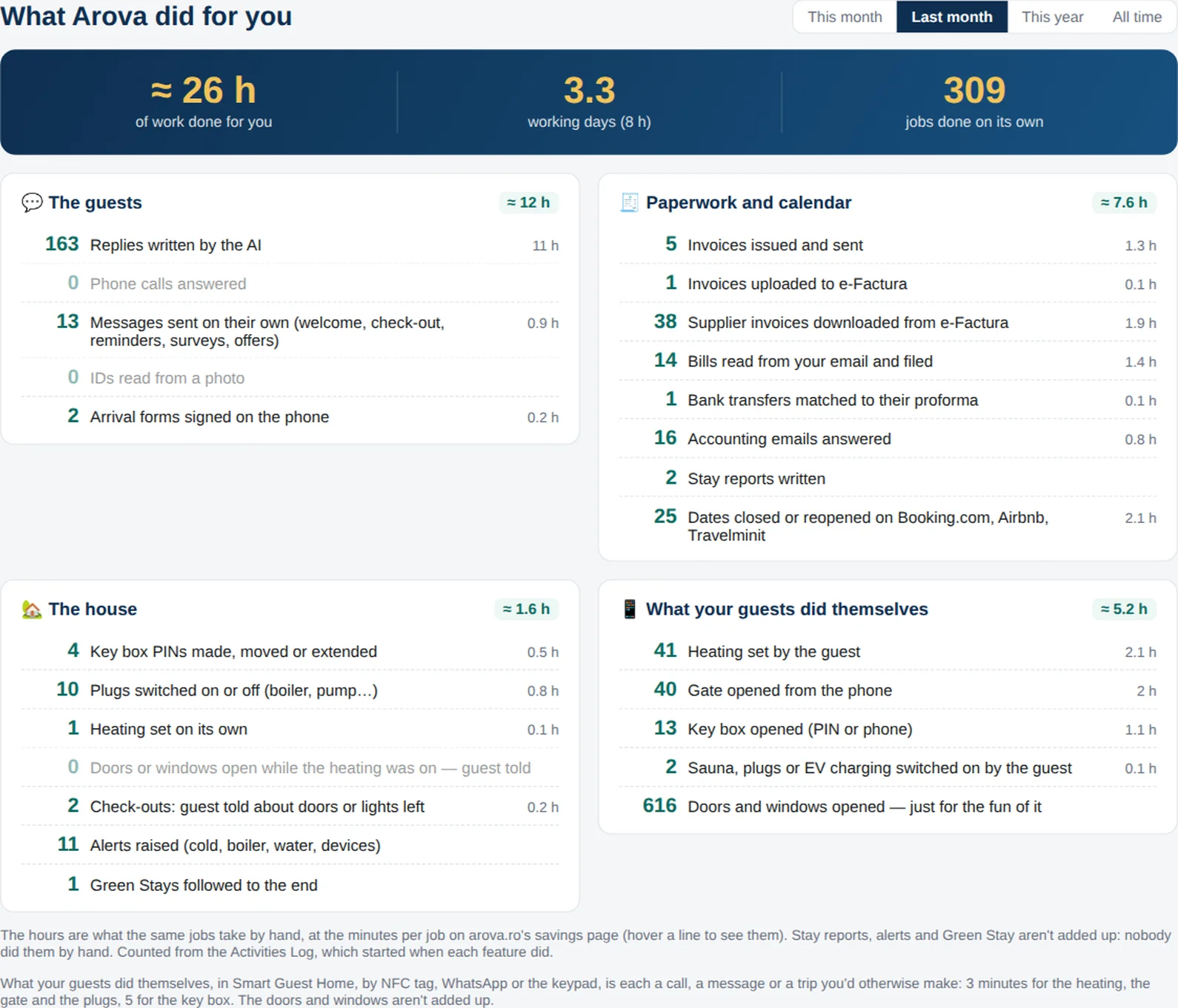
All of the above happens while you're doing something else, so it's easy to miss. The Arova tab, the last one in the app, keeps the count for you. What Arova did for you lists every job Arova did on its own, with the time the same job takes by hand, for this month, last month, this year or since you started.
- The guests: replies written by the AI, phone calls answered, welcome, check-out and reminder messages, surveys and offers sent, IDs read and arrival forms signed. These are steps 1–3, 5 and 8.
- Paperwork and calendar: invoices issued and sent, invoices uploaded to e-Factura, supplier invoices downloaded from it, bills read from your email, bank transfers matched, accounting emails answered, stay reports, and dates closed or reopened on Booking.com, Airbnb and Travelminit. These are steps 2, 7 and 13.
- The house: key box PINs made, plugs switched (the boiler, the water pump), the heating set, doors or windows left open while the heating was on (and the guest told), check-outs where the guest was told about a door or a light, and alerts. These are steps 4–6.
- What your guests did themselves: the heating they set, the gate and the key box they opened, the sauna or the EV charger they switched on, from Smart Guest Home, an NFC tag, WhatsApp or the keypad. Each one is a call, a message or a trip you'd otherwise make, so it counts 3 minutes (5 for the key box). And, just for the fun of it, how many times they opened the doors and windows: those aren't added up. These are steps 4 and 5.
At the top the tab adds it up: the hours of work done for you, the same in working days, and the number of jobs. Last month at Vila Peștera, the villa where Arova was built, that was 309 jobs and about 26 hours, including 163 replies written by the AI and 38 supplier invoices downloaded from e-Factura. About 5 of those hours were the guests' own: they set the heating 41 times, opened the gate 40 times and the key box 13 times, and opened the doors and windows 616 times. The hours use the same minutes per job as the table above.
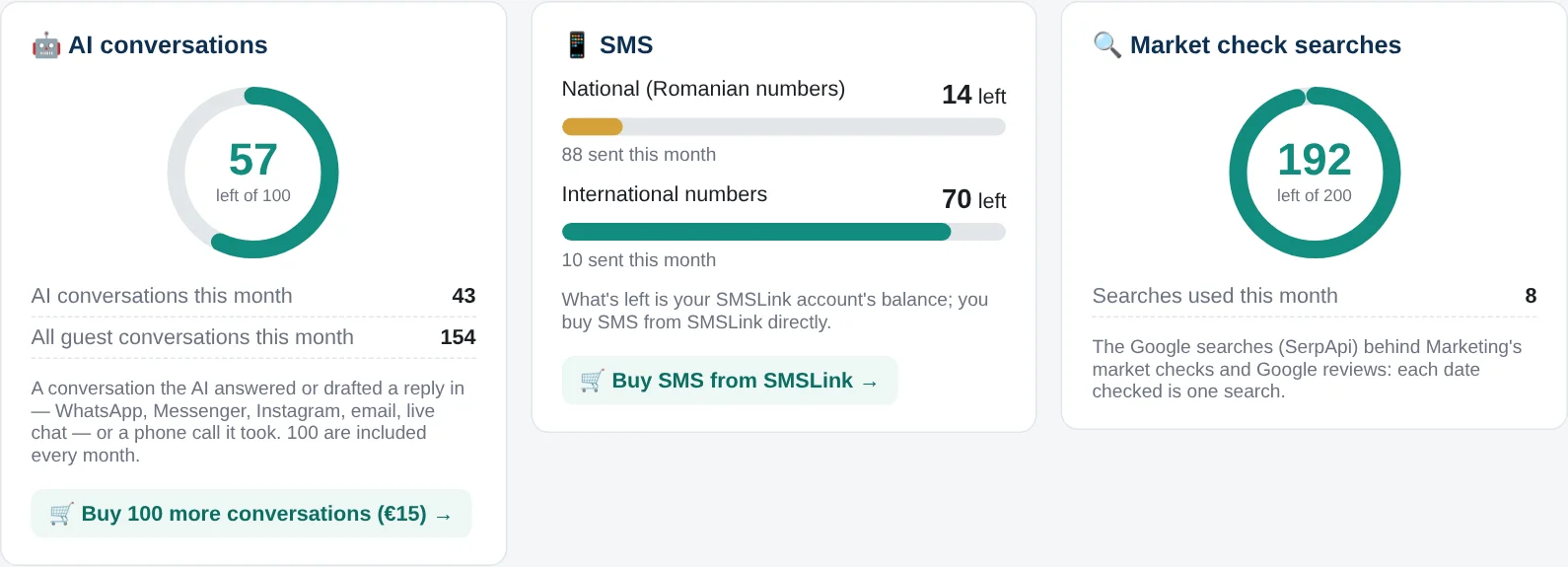
Below that is Your allowances this month:
- AI conversations: how many are left of the 100 included each month, with a link to buy 100 more in the Arova shop.
- SMS: how many went to Romanian and to international numbers, and what's left on your SMSLink account, with a link to SMSLink.
- Market checks: the searches left for checking the competition's prices.
The tab, line by line: the manual.
What's still yours to do
Arova replaces the front office, not the house. These stay with you or your team:
- The cleaning itself. Arova tells the team when and sends their report back to you.
- Problems in the house. A broken boiler still needs someone. Arova tells you sooner, from the sensors or the survey.
- The hand-over where there's no code lock. Without a key box or smart lock, someone still meets the guest.
- The decisions. Approving a reply, a price or a post is a tap, but it's your tap unless you hand it to the autopilot.
What you need for each step
Steps 1–3 and 7–13 need only an Arova account and the accounts you probably already have. The house steps need a few devices, and each one is optional:
| Step | Needs |
|---|---|
| 1. Asks | Your WhatsApp number, and optionally Facebook and Instagram, your mailbox, a phone number for calls |
| 2. Books and pays | A Stripe account for cards; Booking.com and Airbnb calendars if you sell there; e-Factura connected for invoices in Romania |
| 3. Arrival form | Nothing; it's off by default, since pensions keep the building register instead |
| 4. Arrival | A TTLock key box or smart lock with its gateway; Tuya smart plugs or a thermostat for the heating; the Arova TV app, optional |
| 5. During the stay | Tuya sensors for temperature, doors and windows (for Green Stay and alerts) |
| 6. Check-out | Door and window sensors; cameras for lights left on (with a Raspberry Pi at the property) |
| 7. Stay report | Your costs in Arova; meters for electricity, gas and water, optional (without them, those lines are left out) |
The devices are in the Arova shop, set up before they're shipped.
Setting each one up, step by step: the manual.
Questions and answers
Does the guest need to install an app?
No. Everything happens in what they already use: WhatsApp, Messenger, Instagram, email, or a link in the browser. Smart Guest Home is a web page for their stay.
What if the guest doesn't have WhatsApp?
Messages go by email, and in Romania by SMS through your own SMSLink account. Guests can also use the chat on your website or simply call.
Can I keep answering guests myself?
Yes. With auto-reply off, Arova writes each reply and waits for your OK, and you can change it before it's sent. Many owners start like this and turn auto-reply on once they trust the answers.
What about bookings from Booking.com and Airbnb?
They arrive in the calendar and get the same stay: the door code, Smart Guest Home, the cleaning, the stay report. The difference is that their payment and commission stay with the platform.
Do I need the smart home part to use the rest?
No. Steps 1–3 and 7–13 work without any device in the house. The devices add the code, the heating, the check-out check and the energy lines in the stay report.
How do I know what Arova actually did for me?
Open the Arova tab. It counts every job Arova did on its own, from the Activities Log and your invoices, plus what your guests did themselves on their phones (the heating, the gate, the key box), and shows the hours they would have taken by hand, by month, by year or since you started.
Are the figures real?
The volumes (stays, conversations, messages, reply times) come from Vila Peștera's own records for October 2025 to October 2026. The minutes per task are our estimates, and each one is shown on arova.ro so you can use your own. The stay report figures are an example from the demo villa.