 Arova
Romania
Made for Romania: e-Factura, the cash register, the arrival form and the bank, done by Arova
Most booking software is built for the whole world, which means it stops where Romania's own rules begin. The guest pays, and then the invoice for e-Factura, the fiscal receipt, the arrival form and the bank statement are your evening's work. Arova was built at a villa in Romania, so these are part of the product. This article goes through each of them: what it does, what you need, and where it is in the app.
In short
- e-Factura: each payment's invoice is issued and sent to the guest at once, then goes to ANAF by itself after 48 hours.
- Cash register: fiscal receipts printed from Arova on a Daisy register, with the X and Z reports.
- Arrival form: the fișa de anunțare is filled in and signed by the guest on their phone, and its PDF is kept.
- IDs and companies: an ID read from a photo, a company's CUI checked at ANAF.
- Holiday vouchers: tichete de vacanță, alone or with a bank card for the rest.
- The bank: transfers read from your bank's emails and matched to their proforma.
- SMS: sent through your own SMSLink account, for guests without WhatsApp.
- OLX: messages on your OLX ads answered in Reception, like WhatsApp ones.
- The accountant: the month's invoices, bills and forms, each as a ZIP.
All of it appears only for a property in Romania. Arova knows that from the property's Google Maps link, and hides these tabs everywhere else.
1. Invoices and e-Factura
Every confirmed payment is invoiced by itself, whether it came by card, by bank transfer or was marked as paid by hand. For a booking paid in two instalments, each instalment gets its own invoice once it's paid in full.
- The invoice is issued in Arova, with your own invoice series and the next number.
- The guest gets it at once: by email with the PDF, and on WhatsApp while their 24-hour window is open, otherwise by SMS with a link.
- It waits 48 hours. During that time you can still delete it if the guest changes their mind, with no credit note needed, or correct the guest's details.
- It goes to e-Factura by itself, after passing ANAF's own validation first. You see ANAF's answer next to it: being checked, accepted, or rejected with ANAF's reasons. A rejection also reaches your team's phones.
Accounting → Invoicing → Waiting to send to e-Factura
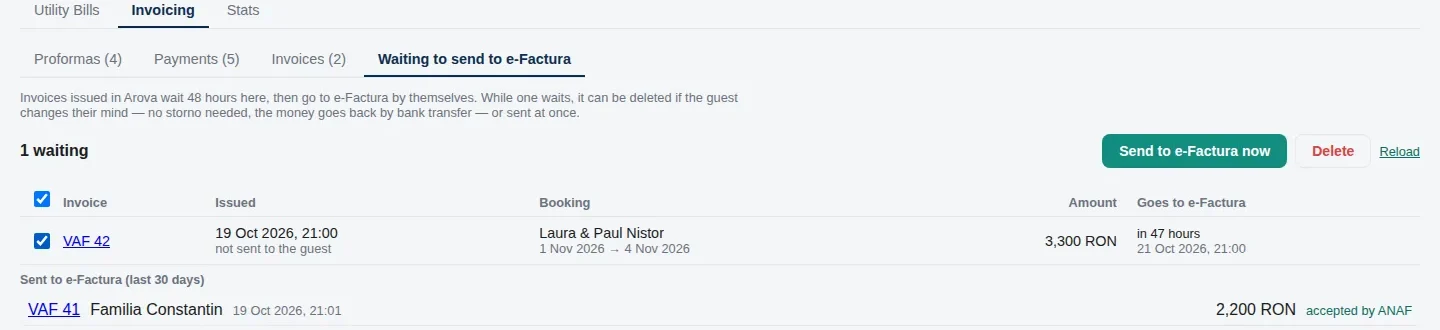
A few details that save trouble later:
- Bucharest addresses need their sector, or e-Factura refuses the invoice. The booking page asks for it as soon as the address is in Bucharest.
- A credit note (factură storno) is one button on an accepted invoice. It's issued in the same series and sent to e-Factura at once.
- Your suppliers' invoices are read from e-Factura every hour and listed by month, each with its PDF and XML, in Accounting → Bills e-Factura.
Connecting to ANAF
Property → Accounts → eFactura → Connect to ANAF
Do this once, on a computer with the company's qualified digital certificate plugged in (a DigiSign or certSIGN token, for example), by the person who has SPV rights for the company. ANAF's page opens, the browser asks for the certificate and its PIN, and you're back in Arova, connected. The login lasts a year, and Arova reminds you 30, 10 and 3 days before it runs out.
SmartBill (optional)
You don't need SmartBill: Arova issues the invoices itself and sends them to e-Factura. If you already work in SmartBill and want to keep it, connect it in Property → Accounts → SmartBill with your API token. Each paid booking then becomes a draft invoice in SmartBill, which you check and issue there.
2. Fiscal receipts on the cash register
A payment taken at the property, by card on your POS terminal or in cash, needs a fiscal receipt. Arova prints it on a Daisy register (for example the Compact S RO) so the receipt and the booking's paperwork stay together.
Accounting → Invoicing → Fiscal receipts
- Fill in the receipt: the amount, how it was paid (card on the POS, or cash), and optionally a company's CUI, which is printed on the receipt.
- Pick the proforma it pays. Arova fills in what's left to pay on it.
- Print. Arova asks once more, because a fiscal receipt can't be undone, and the register prints it within seconds.
- The payment goes on the proforma and the invoice follows as for any other payment, saying it was paid by card on the POS or in cash, according to the fiscal receipt and its date and time.
Without a proforma picked, the payment waits in Payments → To assign until you choose its booking. It's never matched by the amount alone.
The same tab has the X report (the day's totals so far), the Z report that closes the day, and a list of everything sent to the register. A receipt is never sent twice: one the PC didn't pick up in 10 minutes is dropped, so nothing prints later by surprise.
3. The arrival form (fișa de anunțare)
Romanian law asks every paying guest to fill in the arrival and departure form, kept for 5 years and shown to the police on request. Tourist and agrotourism pensions are exempt, because they keep the building register, so the form is off until you turn it on.
Property → Regulatory → Have guests fill in and sign the arrival form
- The guest sees the form on their Smart Guest Home page, before and during the stay, already filled in from their ID or their booking.
- They complete what's missing and sign with a finger. The receptionist's name and signature, drawn once, are printed on every form.
- Two reminders: on the day of arrival, and again the day after if it's still not signed, at the hours you choose in Property → Automation.
- A PDF is kept for every stay. A form still unsigned at check-out is made from what the booking has and marked as not signed, so the month is complete.
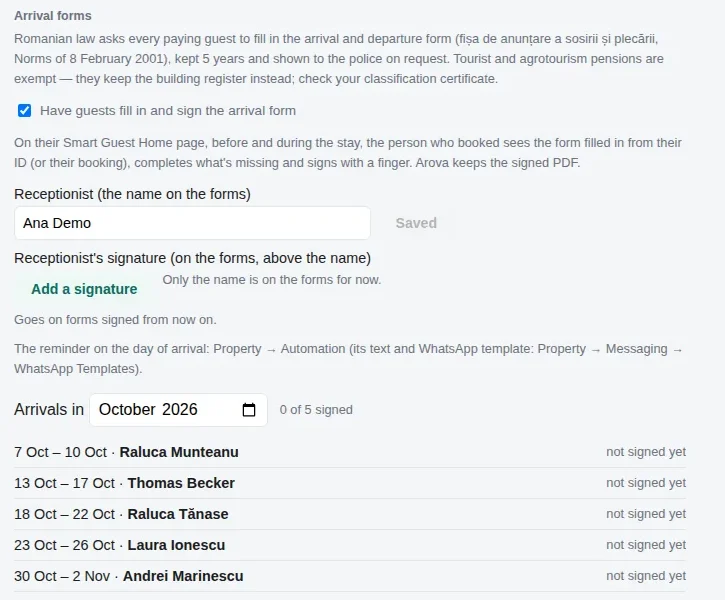
Under the list, Download the month (ZIP) gives you all the month's forms in one file.
4. IDs and companies checked
- An ID read from a photo. When a guest agrees to dates on WhatsApp, Arova asks for a photo of a Romanian ID card or a passport. It reads the name, the CNP or passport number, the address, the date of birth and the nationality, and asks the guest for whatever is missing. Those details go on the proforma, the invoice and the arrival form.
- ID photos don't stay around. They're kept encrypted and deleted 90 days after the stay.
- A company's CUI checked at ANAF. When the invoice is for a company, on the booking page, in the booking or on a new proforma, Check at ANAF fills in the company's official name and address, so the invoice isn't refused later for a typing mistake.
5. Holiday vouchers
Many Romanian guests want to pay with their holiday card (tichete de vacanță). On the booking page and on a stay's payment link, the guest can choose a bank card, a holiday card, or both: the holiday card for part of the amount and a bank card for the rest. Each part is invoiced, and the invoice says how it was paid.
6. Bank transfers and lei
Many guests in Romania still pay by bank transfer. Arova matches those payments without access to your bank account: it reads the "money received" emails your bank already sends.
- Turn on email notifications for transactions in your internet banking, and have them sent, or forwarded, to the property's email address.
- Arova reads each one and matches it to the proforma it pays: by the proforma number in the payment details, otherwise by the amount, and by the payer's name when several bookings have the same amount.
- The invoice follows, and once a booking is paid in full the guest gets the welcome message.
Accounting → Invoicing → Payments
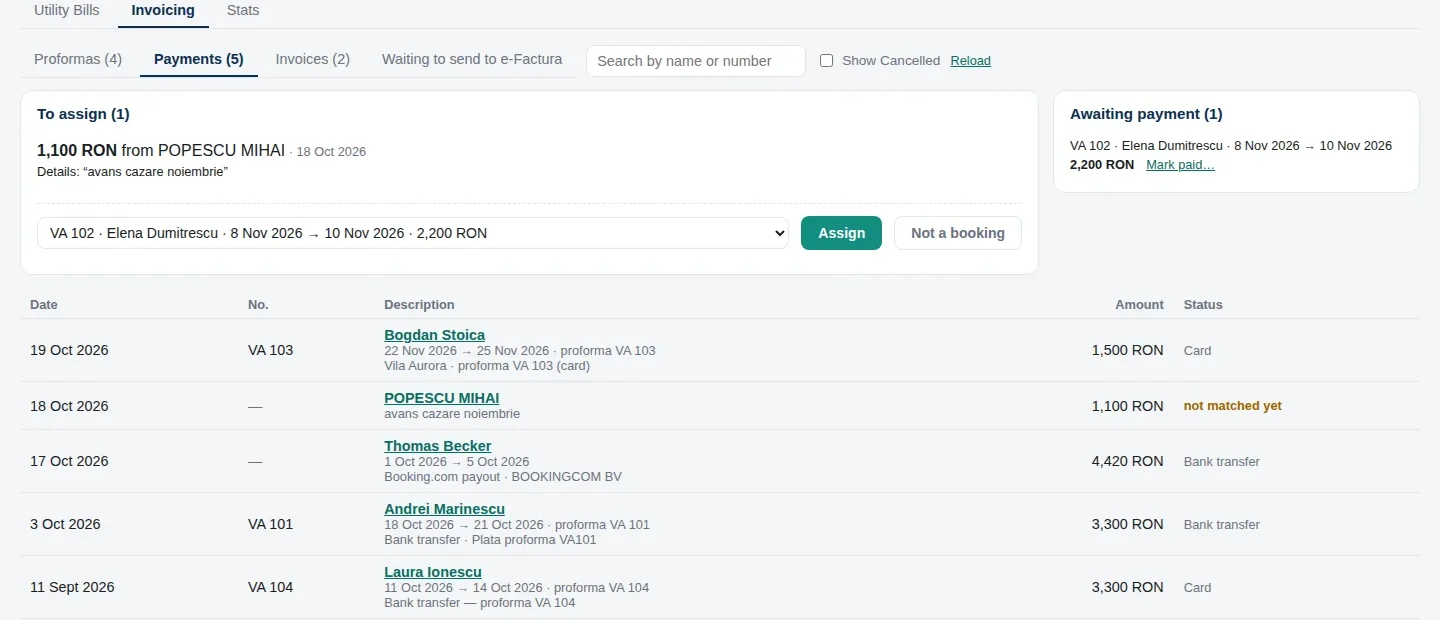
Payouts from Booking.com and Airbnb are recognised too and go to the stay they pay. Proformas and invoices can be in lei or in euro.
7. SMS through SMSLink
Not every guest has WhatsApp. For them, Arova sends SMS through your own account at SMSLink, a Romanian SMS provider, and you pay SMSLink's price directly. Invoice links, arrival form reminders and discount codes reach the guest this way.
Property → Accounts → SMSLink
You create the account at smslink.ro, buy an SMS pack, turn on its SMS Gateway and copy the connection's ID and password into Arova. The tab then shows the SMS left in each pack. A Test mode lets you try it without spending any.
8. OLX chats in Reception
Plenty of pensions and villas in Romania advertise on OLX, and people write to them there. Instead of checking the OLX app between everything else, connect the property's OLX account to Arova: every new message on its ads arrives in Reception within a minute, as a conversation of its own, next to WhatsApp, Messenger and email.
Property → Accounts → OLX
Connect OLX takes you to olx.ro, where you log in with the account that has the ads and allow Arova. From then on:
- Each conversation shows the person's OLX name and the ad they are writing about, with a link to it.
- The AI drafts a reply with your free dates and prices, the same as on WhatsApp, and the auto-reply can answer by itself if you turn it on.
- Your reply goes back into the same OLX chat, so the person sees it on OLX.
- What you write from OLX's own app is kept in the conversation too, so nothing is lost if you answer from the phone.
9. The month's papers for your accountant
At the end of the month, the accountant wants everything in one place. In Accounting, each kind of document has its own tab, by month:
| Tab | What's in it | How it gets there |
|---|---|---|
| Utility Bills | Electricity, gas, water, internet and the other bills you pay for the property. | You forward each bill's email, with the PDF, to the property's mailbox, and its payment confirmation the same way. The AI reads the date, the supplier and the amount, and puts each payment with its bill. |
| Bills | Invoices made out to your company that e-Factura doesn't have, such as foreign suppliers. | The same way. Arova tells them apart by the company's name on the invoice. |
| Bills e-Factura | Your Romanian suppliers' invoices. | Read from e-Factura every hour, with PDF and XML. |
| Invoicing | Your proformas, payments, invoices and fiscal receipts. | Issued by Arova as guests pay. |
In Utility Bills and Bills, tick the documents you want, or the whole month, and Download ZIP gives you the PDFs with a list of them and the total. Check what the AI read from a bill before you send it on: it can be wrong, and a bill it couldn't read fully is marked for you to edit.
10. What you need for each
| Feature | What you need | Where you set it up |
|---|---|---|
| e-Factura | An SPV account and a qualified digital certificate | Property → Accounts → eFactura |
| SmartBill drafts (optional) | A SmartBill account and its API token | Property → Accounts → SmartBill |
| Fiscal receipts | A Daisy register, a Windows PC, DPrint Romania | Accounting → Invoicing → Fiscal receipts → Setup |
| Arrival form | Smart Guest Home on | Property → Regulatory |
| ID reading, CUI check | Nothing | Already on |
| Holiday vouchers | Affiliation with the issuers and an online payment account for them | Set up together with the Arova team |
| Bank transfers | Your bank's transaction emails | Property → Accounts → Email |
| SMS | An SMSLink account with an SMS pack | Property → Accounts → SMSLink |
| OLX chats | The OLX account with your ads | Property → Accounts → OLX |
None of these is required to start. Conversations, bookings and proformas work from the first day, and you add each piece when you need it.
11. Questions and answers
Can Arova answer the messages on my OLX ads?
Yes. Connect your OLX account in Property → Accounts → OLX and the messages on your ads arrive in Reception, where the AI drafts the replies and they go back into the OLX chat. Arova doesn't post or change ads.
My property is a pension. Do I need the arrival form?
Tourist and agrotourism pensions are exempt and keep the building register instead, so check your classification certificate. That's why the form is off until you tick it.
A guest cancelled right after paying. What happens to the invoice?
In its first 48 hours, tick it in Waiting to send to e-Factura and press Delete: the invoice is gone and no credit note is needed. You refund the guest yourself. Once ANAF has accepted an invoice, it can only be reversed with a credit note.
ANAF rejected an invoice. Do I have to issue a new one?
No. When the reason is in the guest's details, such as the name, CNP or CUI, or the address, correct them in the same tab. The invoice keeps its number, gets a new PDF and is sent again.
Can I try e-Factura without sending anything real?
Yes. In the demo, invoices go to ANAF's test system, with no legal effect, so you can book, pay with a simulated card, get the invoice, send it and see it accepted.
Do I need a cash register to use Arova?
No. Payments by card online and by bank transfer are invoiced without one. The cash register is only for money taken at the property, by card on a POS or in cash.
Does Arova log in to my bank?
No. It only reads the notification emails your bank sends to the property's mailbox.
Is the app itself in Romanian?
Yes: the app, the manual and the AI assistant that answers "how do I…" questions are in Romanian and English, and support is in Romanian. Guests are answered in their own language, whatever it is.
For the short version with all nine cards, see Made for Romania on arova.ro.
For the reference version of every option, see e-Factura, Fiscal receipts and Regulatory in the Arova manual.